
In today’s digital landscape, online Google reviews are the new word-of-mouth. They carry immense weight, influencing customer decisions and shaping your brand’s reputation. But managing a flood of reviews across platforms can be overwhelming, leaving you wondering how to turn this valuable feedback into tangible results. That’s where Google Review Management (GRM) tools like GBPGM come in, offering a powerful solution to unlock the potential of online reviews.
This is the era where online visibility is the key to success, mastering Google Review Management becomes paramount. Lets dive into the world of enhanced rankings and unwavering trust as we explore the transformative power of GBPGM.
Why Google Review Management is important?
Google Review Management holds immense importance in today’s digital landscape for several compelling reasons:
- Enhanced Visibility and Ranking:
- Positive reviews play a crucial role in boosting your business’s visibility on Google. The search algorithm often prioritizes businesses with higher ratings and more reviews.
- A well-managed portfolio of positive reviews can significantly improve your ranking in search engine results, making your business more discoverable to potential customers.
- Building Trust and Credibility:
- Trust is a precious commodity in the online realm. Positive reviews act as social proof, assuring potential customers that others have had positive experiences with your business.
- An impressive collection of genuine reviews builds credibility, establishing your brand as reliable and trustworthy in the eyes of consumers.
- Consumer Decision-Making:
- Modern consumers heavily rely on online reviews when making purchasing decisions. Positive reviews serve as endorsements from real customers, influencing others to choose your products or services over competitors.
- A lack of reviews or negative feedback, on the other hand, may deter potential customers, highlighting the significance of actively managing and curating your online reviews.
- Competitive Edge:
- In a saturated market, businesses are constantly vying for consumer attention. A well-maintained Google review profile can provide a competitive edge by showcasing the positive aspects of your business.
- Customers are more likely to choose a business with a substantial number of positive reviews over one with fewer or no reviews.
- Customer Engagement and Loyalty:
- Engaging with customer reviews, whether positive or negative, demonstrates a commitment to customer satisfaction. Addressing concerns promptly showcases your responsiveness and dedication to improving the customer experience.
- Positive interactions with customers through reviews can foster loyalty, turning satisfied customers into repeat business and brand advocates.
- Feedback for Improvement:
- Negative reviews, when handled appropriately, provide valuable feedback for improvement. They highlight areas where your business can enhance its products or services, contributing to continuous growth and refinement.
- Proactive management of reviews allows you to address concerns, rectify issues, and showcase your commitment to continuous improvement.
Key Elements in Google Review Management while using GBPGM Tool
Review management involves five essential elements that we will cover in detail:
- Review Link: A unique link that you can share with customers, making it easier for them to leave reviews for your business.
- Review Poster Creation: A visually appealing poster that encourages customers to leave reviews and enhances your review collection efforts.
- Custom AI Review Suggestion: Provides keyword-based, ready-to-use Google review ideas that customers can easily copy-paste. It helps optimize reviews to boost local SEO and maximize visibility in local searches.
- AI Auto Review Reply: Ensures timely and personalized responses to every new review on your Google Business Profile
- Review Scanner: Review Scanner monitors all your reviews and instantly alerts you if any go missing, providing screenshots and details to help you recover them.

Let’s explore how you can utilize these tools to organically grow your reviews and improve your Google Business Profile’s reputation.
1. Review Link – Simplifying the Review Collection Process
Obtaining genuine reviews is essential for building trust and credibility with potential customers. However, asking customers to leave reviews directly may be cumbersome and often yields limited results. To streamline this process, Google Business Profile Growth Manager offers a unique feature called the “Review Link.”
With the Review Link, you can easily share a custom link with your customers via various platforms, including WhatsApp, Facebook, email, or even in-store. This link takes users directly to the review section of your Google Business Profile, making it hassle-free for them to provide feedback and reviews.
To access your Review Link through GBPGM, follow these simple steps:
Step 1: Open GBPGM Dashboard
Launch the GBPGM app on your Android device or access the GBPGM’s web version for computer users.
Step 2: Locate the “Review Link” Option
On the GBPGM dashboard, you’ll find a prominent “Review Link” option. Click on it to generate your unique Review Link. You have the option to customize the review link with your business name, making it more relatable and trustworthy for customers to trust. Ensure it stays within the 30-character word limit

Step 3: Share the Review Link
Once your Review Link is generated, you can easily copy and share it with your customers through various communication channels. Consider adding the Review Link to your business website, email signature, social media profiles, and promotional materials to encourage customers to leave reviews.
Remember, using a custom link increases the likelihood of customers leaving reviews, as it is easier to remember and more visually appealing than the default link provided by Google.

On Click of Share review Link a window opens from where you can copy or share the link as below.

2. Review Poster Creation – A Visual Cue for Positive Reviews
While the Review Link simplifies the review collection process, some customers may still need an extra nudge to leave a review. To incentivize them, Google Business Profile Growth Manager offers another valuable feature: Review poster Creation.
The Review Poster is a visually engaging and informative poster that encourages customers to leave positive reviews for your business. It serves as a friendly reminder for customers to share their experiences and feedback, potentially leading to a higher number of positive reviews.

To create your own Review Poster through GBPGM, follow these steps:
Step 1: Open GBPGM Dashboard
Access the GBPGM app on your Android device or the web version through LocalSEOtoolsandTips.com for computer users.
Step 2: Access the Review Poster Feature
In the GBPGM dashboard, you’ll find the “Review Poster” option. Click on it to initiate the Review Poster creation process.
Step 3: Customize Your Review Poster
Once you access the Review Poster feature, you’ll have the option to customize various elements, including:
- Color Scheme: Choose from a range of color options to match your brand’s identity or preferences.
- Language: Select the language you want the poster to be displayed in for your target audience.
- Keywords: Add keywords that best describe your business, products, or services. These keywords serve as helpful prompts for customers when writing reviews.
- Logo and Branding: Upload your business logo and customize the poster’s layout to include your branding elements.
Creating a visually appealing and customized Review Poster enhances its effectiveness in encouraging customers to leave review.
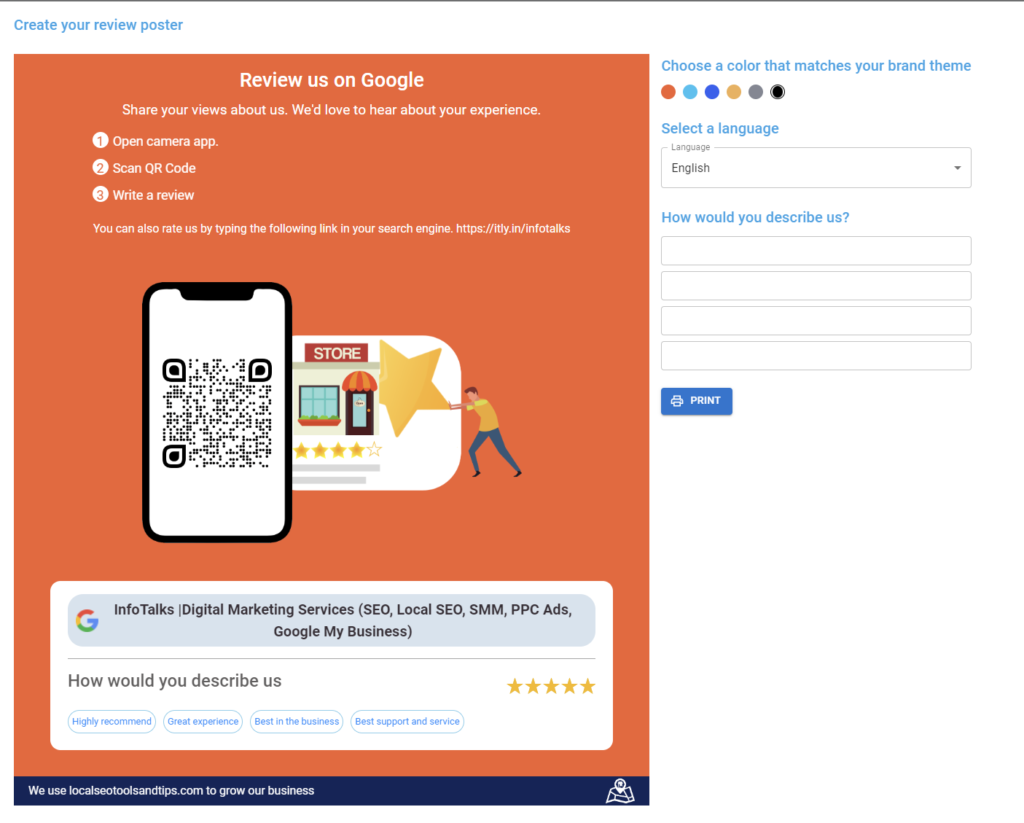
Step 4: Print and Share the Review Poster
Once you’ve customized the Review Poster to your satisfaction, you can print it and display it in your physical store, office, or reception area. Additionally, you can share the digital version of the poster on your website, social media platforms, and email newsletters.
Remember to place the Review Poster in strategic locations where customers are likely to see it, such as near the checkout counter or reception desk. The visually appealing design, combined with the prompt to leave a review, can significantly increase customer engagement and review submissions.
3. Custom AI Review Suggestion
The Auto Suggestion of Reviews feature is a clever way to encourage customers to leave keyword-based reviews. By providing them with ready-made review suggestions, you can ensure that their reviews align with relevant business services and keywords.
Step 1: Generate Review Suggestions
In your business profile, go to the Manage reviews section, in this click on “Auto Suggest Review.”

GBPGM will automatically generate review suggestions with your selected keywords.
Create up to 10 unique review suggestions tailored to different services or products offered by your business.

Step 2: Share Review Suggestions
Share the generated review suggestions with your customers through various channels.
Include the custom review link provided by GBPGM to make it easy for customers to leave reviews.
Customers can simply click on the link, paste the suggestion, give a rating, and post the review.
Now Review suggestion can be added manually there is a switch given to navigate for manual review adding. Default is AI; you can switch to manual and add it manually.

Step 3: Automatic Review Refresh
After a review suggestion is used by a customer, GBPGM automatically removes it from the list and generates a new one.
This ensures you always have fresh review suggestions available for customers.
4. AI Auto Review Reply
GBPGM boasts an exceptional AI-driven review management system with a standout feature for automatically sending AI replies to Google reviews. This comprehensive functionality encompasses the automatic generation of custom AI replies to Google reviews, and a mannual auto-reply system.
Below is the detailed step by step guide to enable it:
A. Setting up Auto-Review Reply
Auto Review Reply is a game-changing feature offered by GBPGM, enabling businesses to automatically respond to customer reviews with personalized messages. This not only saves time but also enhances customer engagement and satisfaction.
Step 1: Enable Auto Review Reply
Click on “Auto custom Reply” and toggle the feature on.
GBPGM will now automatically scan for new reviews every half an hour and generate personalized responses based on the review’s content and rating.
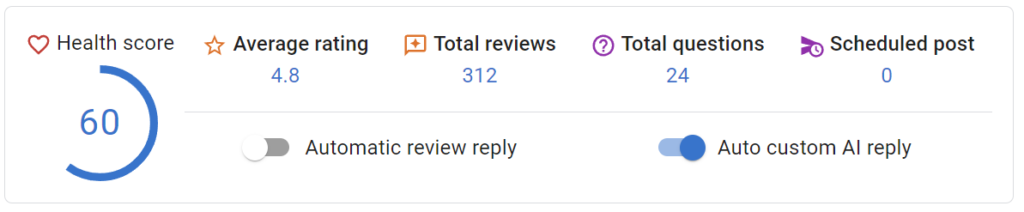
B. Manual Auto Reply
In case you don’t want the review replied by AI still want Auto reply there is a feature where you can define a reply for every star rating , so that when a new review is received the system will reply according the the reply setup by you based on the star rating received. Steps to follow are as below:
Step 1 : Setup the Replies

Here, by going to Manage Review section you get this gear symbol where you have to click and a popup will open up as shown below.

Here, you can manually create a reply for every review and can click on AI button on left top corner and generate it via AI if your AI is enabled in the app.
Once done either manually or via automation, click save to save the replies, which you can edit whenever you want.
Step 2: Enable Automatic Review Reply
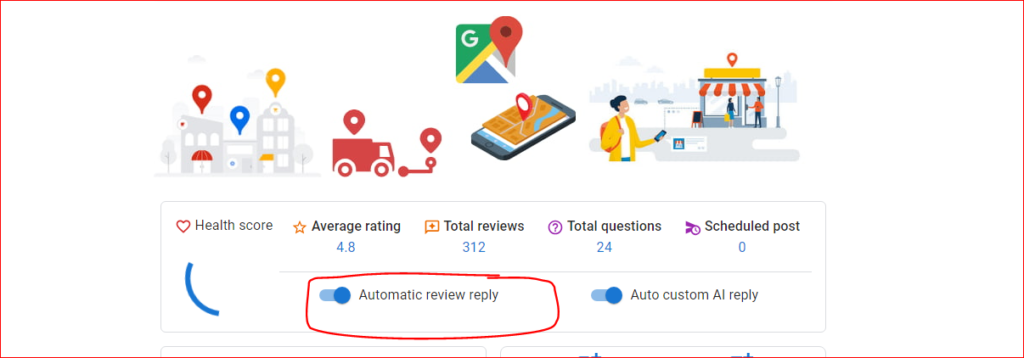
Then, finally, switch the toggle to “On”.
Now, Reviews will be replied to according to the reply setup by you based on the star rating received automatically by GBPGM App. To start and stop, you can also enable it from the home page of the app as shown below.
If you have enabled it from inside you will find the toggle button on the home page also enabled.
Review Scanner
The Review Scanner safeguards your Google Business Profile reviews by tracking them closely and alerting you if any disappear. With screenshots and detailed records, it helps you recover missing reviews, ensuring your visibility and protecting your business reputation.
Follow the steps given below to use GBPGM’s Review Scanner:
Step 1: Log In and Open the Tools Menu
Log into your GBPGM account. After you’re logged in, go to the Tools menu on your dashboard. Here you will find all the features available.

Step 2: Click on the Review Scanner
Find and click on Review Scanner in the Tools menu. This will open the Review Scanner page.

Step 3: Enable the Review Scanner (Needs Tokens)
To use the Review Scanner, you need 100 tokens per month. Here’s how:
- If you have a premium plan and 100 or more tokens, you can start right away.
- If you don’t have enough tokens, you can buy 100 tokens and enable the feature, even without a premium plan.

Step 4: Start the Scan Reviews Process
Click on Scan Reviews to create a backup of your reviews. This will show the number of reviews saved and make sure they are ready for monitoring.

Step 5: Turn On Auto Deduct for Continuous Monitoring
To keep your reviews monitored every day, turn on Auto Deduct. This will use 100 tokens at the end of each month to continue the service without stopping. This daily scan helps spot any changes.
Important Note: If your tokens run out and the service stops, reviews added during that time may not be monitored or backed up.
Step 6: What to Do If a Review Goes Missing
If the tool finds a missing review, it will send you an alert. You can:
- See details about the missing review.
- Download a screenshot by clicking the Appeal button.
- Go to the Review Appeal Form to ask Google to restore the review.


Step 7: Check Restored Reviews
When a review is restored, the tool will update its status to show that it has been recovered. This helps you stay confident that your reviews are safe.
To understand the process you can check the video to see the steps in practical.
Watch the Complete Tutorial of GBPGM
Optimizing Review Management
While using the Review Link and creating Review Posters are effective strategies, optimizing your review management goes beyond these features. Here are some additional tips to maximize the impact of reviews on your Google Business Profile:
1. Engage with Reviews
Responding to customer reviews, whether positive or negative, demonstrates your attentiveness to customer feedback and shows that you value their opinions. Always thank customers for positive reviews and address any negative feedback with a helpful and professional response. This engagement fosters trust and credibility with potential customers.
2. Provide Outstanding Customer Service
Exceptional customer service experiences lead to positive reviews. Aim to exceed customer expectations and provide a seamless and pleasant experience throughout their interactions with your business. Satisfied customers are more likely to leave glowing reviews, promoting your reputation and attracting new customers.
3. Encourage Honest Feedback
While positive reviews are essential, genuine feedback, both positive and constructive, helps your business grow. Encourage customers to share their honest opinions about their experiences, as this feedback can highlight areas for improvement and ultimately lead to better customer satisfaction.
4. Share Positive Reviews on Social Media
Use your social media platforms to showcase positive reviews from satisfied customers. Sharing reviews on social media not only celebrates your customers’ experiences but also encourages others to leave reviews. This further boosts your profile’s credibility and attracts potential customers to engage with your business.
5. Monitor and Analyze Review Trends
Regularly monitor the trends in your reviews to identify patterns and areas for improvement. Analyze common themes in positive reviews to highlight your business’s strengths. Similarly, address any recurring issues raised in negative reviews to rectify potential problems and improve customer experiences.

Watch the Complete Tutorial of GBPGM
Conclusion
Effectively managing reviews is an integral part of growing your Google Business Profile and building a strong online presence. The Review Link and Review Poster features offered by Google Business Profile Growth Manager simplify the review collection process and encourage customers to share their experiences.
By leveraging these tools and implementing effective review management strategies, you can enhance your profile’s reputation, attract more customers, and improve your local search rankings. Remember to engage with reviews, provide exceptional customer service, encourage honest feedback, and showcase positive reviews on social media to make the most of your reviews.
