
Local SEO for Doctors is becoming one of the most important strategies for growing a medical practice today. Patients now rely heavily on Google to find nearby healthcare services. When someone needs medical help, their first step is usually a quick online search.
People commonly search for phrases like “doctor near me,” “best dentist in my city,” or “skin specialist nearby.” Within seconds, Google shows a map with a few top clinics along with their ratings, reviews, and contact details.
Most patients choose a doctor from these top results on Google Maps. Clinics that appear here receive the majority of calls, website visits, and appointment bookings.
This is why Local SEO for Doctors has become essential. It helps your clinic appear in local search results when nearby patients are actively looking for medical services.
In this guide, you will learn simple and practical strategies to improve your local visibility, rank higher on Google Maps, and attract more patients to your clinic.
Table of Contents
ToggleWhat is Local SEO for Doctors?
Local SEO for Doctors means improving your clinic’s online presence so that patients in your area can easily find you on Google.
When someone searches for a doctor nearby, Google shows results based on location, relevance, and trust.
For example:
A patient in London searches:
“Best dentist near me”
Google shows:
-
Dentist A
-
Dentist B
-
Dentist C
These clinics appear inside a section called the Google Local Pack.
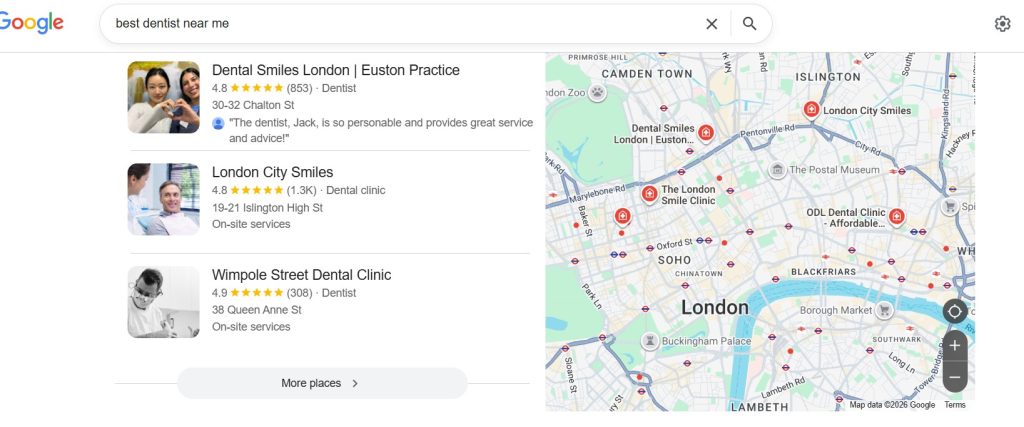
The Local Pack usually includes:
-
Google Map
-
Top 3 clinics
-
Ratings
-
Reviews
-
Address
-
Call button
Doctors who appear here receive the maximum visibility.
If your clinic does not appear here, many patients may never discover you.
That is why Local SEO for Doctors focuses mainly on ranking in Google Maps and local search results.
Why Local SEO is Extremely Important for Doctors
Healthcare searches are different from other searches.
When someone searches for a doctor, they usually need immediate help.
They are not browsing casually. They are looking for a solution.
Let’s look at some important insights about local search:
-
Almost 46% of Google searches are local searches
-
Around 76% of people visit a business within 24 hours after searching
-
More than 60% of healthcare searches happen on mobile devices
-
Nearly 70% of patients check reviews before choosing a doctor
This means patients are actively looking for clinics nearby.
If your clinic appears in local search results, you have a high chance of gaining a new patient.
Without Local SEO, your competitors may receive those patients instead.
How Google Decides Which Doctors Appear in Local Results
Google uses three main factors to decide which clinics appear in Google Maps.
Understanding these factors helps doctors improve their rankings.
1. Relevance
Relevance means how closely your clinic matches the search query.
For example:
If someone searches:
“Orthopedic doctor in Sydney”
Google will show clinics that clearly mention:
-
Orthopedic treatment
-
Sydney location
If your profile simply says “medical clinic”, Google may not understand your specialization.
Therefore, your profile must clearly mention your medical specialty and services.
2. Distance
Distance is simply how close your clinic is to the patient.
For example:
If someone searches from Chicago, Google will prefer clinics within Chicago or nearby areas.
Even the best clinic may not appear if it is too far from the searcher.
This is why Local SEO focuses on targeting specific cities and neighborhoods.
3. Prominence
Prominence means how well-known and trusted your clinic is online.
Google measures this using signals like:
-
Google reviews
-
Website authority
-
Online mentions
-
Local directory listings
-
News coverage
Clinics with a strong online reputation usually rank higher.
Step-by-Step Guide to Local SEO for Doctors
Now, let’s understand how doctors can actually implement Local SEO.
We will explain each step in simple language.
Step 1: Create and Optimize Your Google Business Profile
The most important part of Local SEO is your Google Business Profile (GBP).
This is the profile that appears in Google Maps.
When someone searches your clinic name, they see:
- Clinic name
- Address
- Phone number
- Photos
- Reviews
- Directions
- Appointment link
If this profile is well optimized, your clinic can appear in local search results.
Information you must add to your profile
Make sure your profile includes:
- Clinic Name
- Correct Address
- Phone Number
- Website
- Working Hours
- Doctor Specialization
- Services List
- Photos of Clinic
- Doctor Credentials
Example:
A dermatology clinic in Dubai that uploads treatment photos, clinic interior images, and service descriptions will rank higher than a clinic with empty details.
Google prefers complete and active profiles.
How the GBPGM Tool Helps Doctors
Regularly managing a Google Business Profile can take time.
Doctors are usually busy with patients and appointments.
This is where the GBPGM tool becomes helpful.
The GBPGM tool simplifies Local SEO tasks by allowing clinics to:
-
Manage Google Business Profile updates
-
Schedule Google posts
-
Track ranking on Google Maps
-
Monitor reviews
-
Improve local visibility
Instead of manually checking everything, doctors can manage their local SEO activities from a single dashboard.
Step 2: Use the Right Local Keywords
Patients rarely search just for “doctor.”
They search for specific services and locations.
Examples include:
-
Dentist in London
-
Pediatrician near me
-
Orthopedic doctor in Melbourne
-
Dermatologist in Mumbai
These are called local keywords.
Using these keywords helps Google understand:
-
What service you offer
-
Which city you serve
Where to add these keywords
You should add them in:
-
Website pages
-
Google Business Profile description
-
Blog posts
-
Service pages
For example:
Instead of writing:
“We provide dental treatments.”
Write:
“We provide dental treatments in New York City including implants, root canals, and cosmetic dentistry.”
This small change improves Local SEO.
Step 3: Get More Google Reviews
Reviews play a major role in patient decisions.
When patients see many positive reviews, they trust the clinic more.
For example:
A patient searching in Toronto may see two clinics.
Clinic A
Rating: 4.1
Reviews: 20
Clinic B
Rating: 4.8
Reviews: 200
Most patients will choose Clinic B.
Google also prefers businesses with:
-
More reviews
-
Higher ratings
-
Recent feedback
How doctors can get more reviews
You can ask patients politely after treatment.
Example:
“Thank you for visiting our clinic. If you had a good experience, please consider leaving us a Google review.”
You can also send review links via:
-
SMS
-
WhatsApp
-
Email
The GBPGM tool’s Review Management can help track and get more reviews using QR Code, Review Poster, and respond to feedback easily.
Also Read: The Right Way to Ask for Google Reviews – Proven Tips and Pitfalls to Avoid

Step 4: List Your Clinic on Local Directories
Google trusts clinics that appear on multiple reliable websites.
These mentions are called local citations.
Common healthcare directories include:
-
Practo
-
Healthgrades
-
Zocdoc
-
Yelp
-
Justdial
Your clinic information must be consistent everywhere.
This means the following must match exactly:
-
Clinic name
-
Address
-
Phone number
Consistency improves trust signals for Google.
Step 5: Create Location-Based Pages on Your Website
If your clinic serves multiple areas, you should create location pages.
Example:
A dental clinic in London may create pages such as:
-
Dentist in Camden
-
Dentist in Chelsea
-
Dentist in Westminster
Each page should include:
-
Location name
-
Nearby landmarks
-
Treatment details
-
Patient reviews
This helps your clinic rank in multiple local searches.
Step 6: Publish Helpful Medical Content
Patients often search for health information online.
Doctors can publish helpful articles such as:
-
Causes of back pain
-
Acne treatment options
-
Symptoms of heart disease
-
Child vaccination guides
Example blog topics:
“10 signs you should visit a cardiologist”
“Best acne treatments recommended by dermatologists”
Helpful content increases:
-
Website traffic
-
Patient trust
-
Google authority
Step 7: Post Updates on Google Business Profile
Google allows businesses to post updates directly on their profile.
Doctors can share posts such as:
Health awareness tips
Clinic announcements
Seasonal health advice
New treatments available
Example:
A dental clinic in Sydney posts:
“Free dental consultation for children this weekend.”
These posts keep your profile active.
Google prefers profiles that regularly update information.
The GBPGM tool helps doctors schedule these posts automatically.

Step 8: Improve Your Clinic Website
Your website should clearly explain your services and location.
Important pages include:
- Home Page
- About Doctor
- Services
- Blog
- Contact Page
Make sure your website also includes:
- Google Map embed
- Appointment booking option
- Click-to-call buttons
This improves both patient experience and SEO performance.
Step 9: Track Your Local Rankings
Local rankings change based on location.
Your clinic might rank:
-
#1 near your clinic
-
#4 a few kilometers away
This is why GeoGrid rank tracking is useful.
It shows how your clinic ranks across different areas of a city.
The GBPGM tool provides GeoGrid tracking, helping doctors identify areas where they need better visibility.

Common Local SEO Mistakes Doctors Should Avoid
Many clinics fail to rank because of simple mistakes.
Avoid these issues:
- Incomplete Google profile
- Ignoring patient reviews
- Inconsistent clinic details online
- No location keywords
- Inactive Google profile
Fixing these issues can significantly improve rankings.
Benefits of Local SEO for Doctors
When doctors implement Local SEO correctly, they experience several benefits.
More patient inquiries
Higher visibility leads to more calls and appointments.
Increased trust
Positive reviews and a strong online presence build patient confidence.
Lower marketing cost
Local SEO generates patients without continuous advertising.
Strong competitive advantage
Clinics with strong Local SEO outperform competitors.

Frequently Asked Questions (FAQs)
What is Local SEO for Doctors?
Local SEO for Doctors is the process of optimizing a clinic’s online presence, so it appears in Google Maps and local search results when patients search for nearby healthcare services.
How long does Local SEO take to show results?
Most clinics start seeing noticeable improvements within 3 to 6 months, depending on competition and optimization efforts.
Why are Google reviews important for doctors?
Reviews increase patient trust and influence Google rankings. Clinics with more positive reviews often appear higher in local search results.
Do doctors need a website for Local SEO?
A website is not mandatory, but it greatly improves search visibility, credibility, and patient engagement.
How can doctors manage Local SEO easily?
Doctors can simplify Local SEO tasks using tools like GBPGM, which help manage Google Business Profile, track rankings, and schedule updates.
Final Thoughts
The healthcare industry is becoming increasingly digital.
Patients now rely heavily on Google and online reviews when choosing doctors.
If your clinic appears in the top Google Maps results, you gain a major advantage.
By applying the strategies discussed in this guide, doctors can:
-
Improve their visibility in local searches
-
Build patient trust through reviews
-
Attract more appointment bookings
With consistent effort and the help of tools like GBPGM, doctors can successfully dominate Google Maps and local search results.
