If you want more customers from your nearby area, you must understand Local Search Results.
People search every day for services “near me.” Google shows them the most relevant local businesses first.
If your business appears there, you win attention, traffic, and sales.
If not, your competitors get those customers.
This guide will help you understand how Local Search Results work and how you can rank higher using Google My Business (now called Google Business Profile) and smart Local SEO strategies.
What Are Local Search Results?
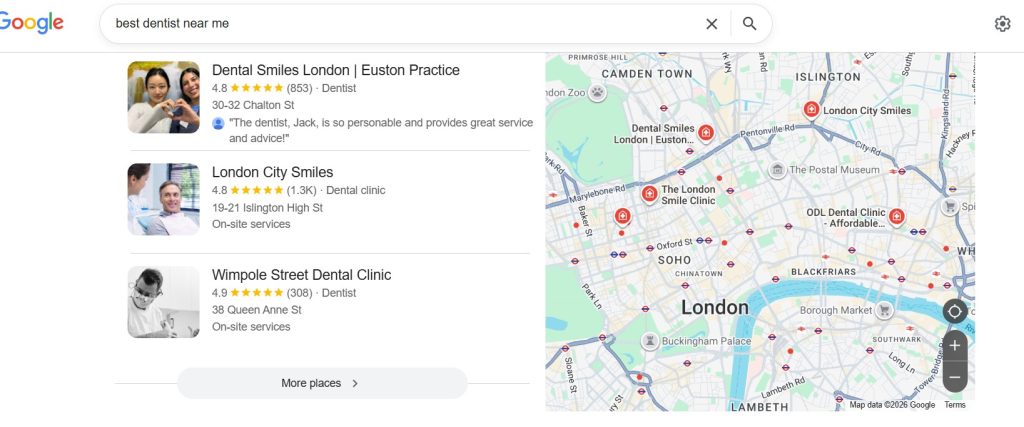
Local Search Results are listings that appear when users search for services in a specific location.
For example:
-
“Best cafe in New York”
-
“Dentist near me in London”
-
“CLAT Coaching institute in Gurugram”
Google shows:
-
A Map Pack (Top 3 listings)
-
Business profiles
-
Reviews, ratings, and directions
These results come from Google Business Profile listings, websites, and local SEO signals.
Why Local Search Results Matter for Your Business
Local searches have strong buying intent. People searching locally are ready to act.
Key Benefits:
-
Higher visibility in your area
-
More calls and visits
-
Better trust through reviews
-
Increased conversions
Stat Insight:
Over 75% of users who search locally visit a business within 24 hours.
How Google Ranks Local Search Results
Google uses three main factors:
1. Relevance
Your business must match what the user is searching for.
Example:
If someone searches “digital marketing agency,” your category must reflect that.
2. Distance
Google checks how close your business is to the searcher.
Example:
A bakery in Paris will rank higher for users nearby.
3. Prominence
This shows how popular and trusted your business is.
It depends on:
-
Reviews and ratings
-
Website authority
-
Backlinks
-
Online mentions
What Is Google My Business (Google Business Profile)?
Google My Business (GMB), now called Google Business Profile, is a free tool by Google.
It helps you:
-
Show your business on Google Search and Maps
-
Add contact details, photos, and services
-
Collect reviews
-
Engage with customers
Your profile is the foundation of your Local Search Results ranking.
Also Read: What is Google Business Profile? Why it is important to add your Business to Google?

How to Optimize for Local Search Results
Let’s break this into simple, actionable steps.
1. Create and Optimize Your Google Business Profile
Make sure your profile is complete.
Include:
-
Business name
-
Address
-
Phone number
-
Website
-
Working hours
Add:
-
High-quality images
-
Business description with keywords
-
Services and products
Also Read: What is Google Business Profile? Why it is important to add your Business to Google?
2. Use Local Keywords Smartly
Use keywords like:
-
“Best salon in Lucknow”
-
“Affordable gym in Mumbai”
-
“Top dentist in Sydney”
Tip: Use long-tail keywords. They bring more targeted traffic.
Also Read: Boost Your Local SEO with Strategic Location Keywords in Google Business Profile
3. Collect and Manage Reviews
Reviews directly impact Local Search Results.
Ask customers to:
-
Leave positive reviews
-
Share their experience
Always:
-
Reply to reviews
-
Solve complaints professionally
Example: Restaurants in Dubai with 4.5+ ratings rank higher.
Also Read: Boost Your Ranking, Build Trust: Master Google Review Management with GBPGM
4. Maintain NAP Consistency
NAP means:
-
Name
-
Address
-
Phone Number
Keep it consistent across:
-
Website
-
Directories
-
Social media
Also Read: Unlocking Local SEO Success: The Power of NAP Consistency
5. Optimize Your Website for Local SEO
Your website must:
-
Be mobile-friendly
-
Load fast
-
Include local keywords
Add:
-
Google Maps embed
6. Build Local Citations and Backlinks
List your business on:
-
Local directories
-
Industry websites
Get backlinks from:
-
Blogs
-
News sites
-
Local portals
Also Read: Local Backlinks: The Secret Weapon to Rank Your Business in Local Search
7. Post Regular Updates on Google
Use Google Posts to:
-
Share offers
-
Announce updates
-
Promote events
Active profiles rank better.
Also Read: Boost Your Google Ranking Using Post Scheduling
How GBPGM Tool Simplifies Local SEO
Managing Local SEO manually can take time. This is where GBPGM (Google Business Profile Growth Manager) helps.
What GBPGM Can Do:
-
Automate Google posts
-
Suggest keyword-optimized content
-
Track rankings in Local Search Results
-
Manage multiple business profiles
-
Analyze performance insights
and much more…..
Example:
A business in Toronto can schedule posts for a whole month in minutes using GBPGM.
This saves time and improves consistency, which boosts rankings.
Common Mistakes to Avoid
Avoid these errors if you want better Local Search Results:
-
Incomplete business profile
-
Wrong or outdated contact details
-
Ignoring customer reviews
-
No local backlinks
Real-World Examples of Local Search Success
Example 1: Coffee Shop in New York
A cafe optimized its profile with keywords, reviews, and images.
Result: It ranked in the top 3 Local Search Results.
Example 2: Salon in London
The salon used regular Google Posts and review replies.
Result: 2x increase in bookings.
Example 3: Coaching Institute in Gurugram
By using GBPGM and local SEO strategies:
-
Better keyword targeting
-
Regular updates
Result: Higher visibility and more inquiries.
Future of Local Search Results
Local SEO is evolving fast.
Trends to Watch:
-
Voice search (“near me” queries)
-
AI-based recommendations
-
Visual search
-
Hyper-local targeting
Businesses must stay updated to remain competitive.
Final Thoughts
Local Search Results are powerful. They connect your business with nearby customers at the right time.
If you:
-
Optimize your Google Business Profile
-
Use local SEO strategies
-
Leverage tools like GBPGM
You can grow your visibility, traffic, and revenue.
Start now. Your customers are already searching.
FAQs About Local Search Results
1. What are Local Search Results?
These results show businesses based on location when users search for nearby services.
2. How can I rank higher in Local Search Results?
Optimize your Google Business Profile, use local keywords, collect reviews, and maintain consistency.
3. Is Google My Business free?
Yes, Google Business Profile is a free tool by Google.
4. How do reviews affect Local SEO?
Reviews improve trust and increase your chances of ranking higher.
5. What is GBPGM tool?
GBPGM is a tool that helps automate and manage your Google Business Profile for better Local SEO performance.
